weoEDI - La solución única de weoInvoice para la comunicación EDI de facturación electrónica
weoInvoice ha desarrollado una solución, en colaboración con Saphety, con el objetivo de ofrecer el mayor nivel posible de automatización, transparencia y simplicidad en la gestión del proceso de facturación electrónica, que ahora se presenta como una nueva y obligatoria realidad para las empresas.
De este modo, weoInvoice ofrece ahora las siguientes opciones nuevas en la vista de facturas:
Exportar CIUS-PT
Esta opción permite exportar y guardar el archivo XML utilizando el modelo de datos semánticos propuesto por la Norma Portuguesa (CIUS-PT) correspondiente a la factura en cuestión.
Enviar CIUS-PT
Esta opción permite enviar la factura electrónica vía EDI directamente al cliente o entidad pública.
Debe utilizar esta opción únicamente si su cliente está preparado para recibir facturas electrónicas por EDI.
Firmar PDF
Esta opción aplica una Firma Digital Cualificada al archivo PDF de la factura y archiva el documento en formato digital.
La factura firmada cumple con la legislación vigente sobre facturación electrónica y está lista para ser enviada por correo electrónico.
Firmar y Enviar PDF
Esta opción aplica una Firma Digital Cualificada al archivo PDF de la factura y lo envía por correo electrónico al cliente (si dispone de dirección de email).
La factura firmada cumple con la legislación vigente sobre facturación electrónica.
Abrir PDF
Esta opción permite visualizar el archivo PDF.
A diferencia del navegador, si abre el documento con una aplicación lectora de PDF, podrá visualizar la firma digital aplicada.
Enviar PDF
Esta opción envía el archivo PDF firmado por correo electrónico al cliente (si dispone de dirección de email).
La factura enviada cumple con la legislación vigente sobre facturación electrónica.
¿A qué clientes/receptores puedo enviar facturas electrónicas?
Gracias a la integración con la red Saphety Invoice Network, weoInvoice está preparado para comunicar directamente sus facturas con más de 3.000 entidades de distintas redes:
-
 Saphety
-
 Espap
Espap
-
 iLink
iLink
-
 Indra
Indra
-
 Seres
Seres
-
 Yet
Yet
Puede consultar la lista completa de entidades disponibles conectadas a weoInvoice en este enlace.
Esta lista se actualiza y amplía de forma continua.
weoEDI – ¿Cómo utilizarlo?
Las opciones indicadas anteriormente, que permiten automatizar y comunicar la factura electrónica a los clientes, están disponibles en el plan Exclusive Plus(+) de weoInvoice.
La única excepción es la opción Exportar CIUS-PT, que está disponible en el plan Exclusive.
Puede suscribirse a los planes aquí.
Para utilizar estas opciones, debe:
2. Suscribirse a un plan de facturación electrónica en el portal de Saphety.
Puede consultar la lista de entidades receptoras disponibles a través de este enlace para asegurarse de que es posible enviar el CIUS-PT desde weoInvoice.
Vídeo demostrativo
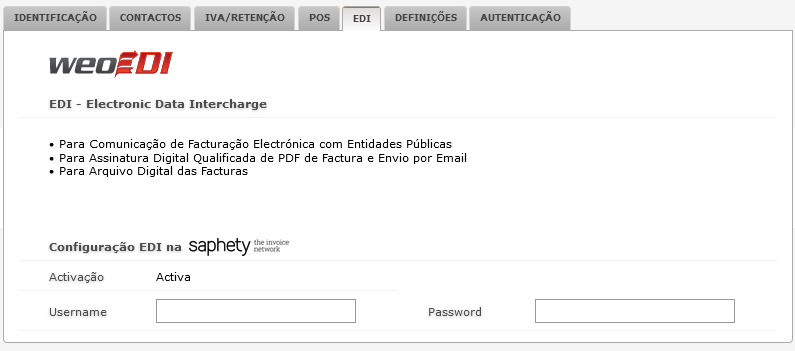
3. Acceder a la Configuración de weoInvoice, activar weoEDI e introducir el nombre de usuario y la contraseña registrados en el portal de Saphety.
4.Comenzar a utilizar las opciones de weoEDI en la vista de facturas cerradas (no anuladas).
5.Su cuenta de weoInvoice mantendrá el archivo digital de todas las facturas electrónicas creadas.